
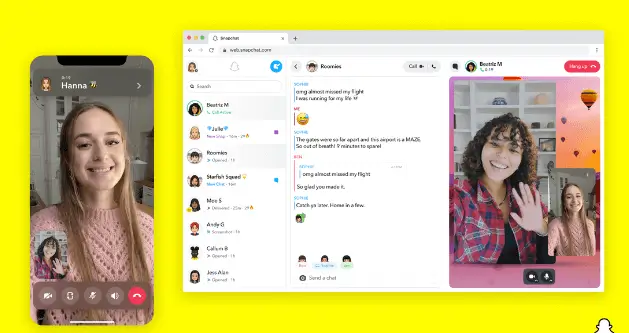
Snapchat is making the desktop version of its app, Snapchat for Web, available to its entire global community, the company announced on Thursday. The social network initially launched Snapchat for Web in July to Snapchat+ subscribers in the United States, United Kingdom, Canada, Australia and New Zealand. Now, the desktop version can be accessed by all Snapchat users.
With Snapchat for Web, you can send messages and snaps, and also chat via video and voice calls. Snapchat for Web also includes access to the mobile app’s messaging features, including chat reactions. It also now features more than 10 Lenses for video calls.
To access Snapchat for Web, you need to head to web.snapchat.com and log in with your Snapchat username and password. You’ll then be prompted to complete two-step verification on your phone. Once you open Snapchat for Web, you can continue your conversations from where you left them on mobile. When you use Snapchat for Web, your Bitmoji will appear in chats holding a laptop to indicate to others that you’re accessing the chat via your desktop. In addition, the web version of the app includes a privacy screen that hides the Snapchat window if you click away for another task.
As with the mobile Snapchat experience, messages that are sent via Snapchat for Web are automatically deleted after 24 hours. The company also says Snapchat for Web will prevent people from taking screenshots. At the time of the launch, the company said it was aware that people can still take a picture on the screen from their phone, noting that the product isn’t perfect.
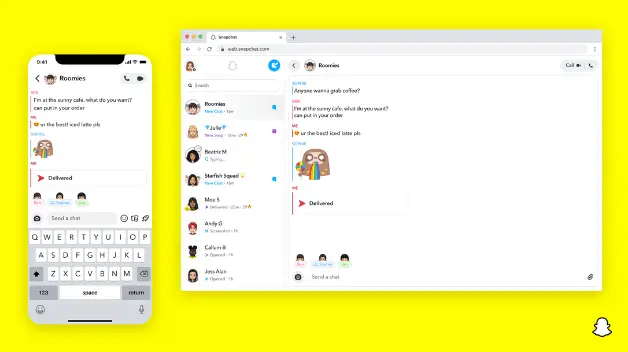
The company previously shared that the average caller on Snapchat spends more than 30 minutes a day on calls. Despite still seeing itself as a mobile-first platform, Snap said it decided it was time to bring Snapchat’s core features to the web after listening to feedback from users.
For the time being, Snap is focused on bringing the app’s core features to the web and will build out the experience from there. The company plans to bring the app’s other features, including viewing Stories and Memories to Snapchat for Web in the future.
The wider launch of Snapchat for Web comes as the social media platform has been looking to better compete with TikTok and Instagram, both of which can be accessed via the web.
In addition to making Snapchat for Web available to all users, Snapchat is also rolling out new Chat Shortcuts at the top of the chat tab to make it easy to do things like spot unread Snaps and chats from friends, see missed calls and reply to stories. The company says the shortcuts will also remind you if you need to reply to someone and also show you when your friends’ birthdays are coming up.
Snapchat is also launching a new “Question Stickers” feature to let users ask questions in their stories in an AMA-style. You can use the feature to do things like ask your friends what you should wear to school and what you should have for dinner. It’s worth noting that the new feature is similar to Instagram’s question sticker.
The company says these new features are available now or coming soon.


Hey there 👋 I’m Awais, the curious mind behind iTech Observer.
I’m a tech blogger who loves diving deep into AI and Cybersecurity, but my real passion is making those topics easy to understand — especially for small business owners trying to grow in a digital world.
Here on iTech Observer, I break down the latest tech trends, tools, and security tips into practical, real-world advice you can actually use. Whether you’re trying to secure your business website, understand how AI can boost productivity, or just want to stay updated on what’s next in tech — you’re in the right place.
I believe technology should empower, not overwhelm.
Let’s explore the innovations that can make your business stronger, smarter, and more secure.

https://shorturl.fm/Ytm9W
Jiliaisa offers really awesome bonuses. Great games too! Give it a shot. You can find it at jiliaisa.
Wjslotcasino… sounds interesting! The name alone makes me want to spin. Anyone had any luck on this site? I’m always on the hunt for a legit casino with decent odds. Worth a shot? Join wjslotcasino now.
MNL63app is the bomb! Been playing for a while now and I’m actually up a bit. The app is super user-friendly and the games are fun. Definitely recommend! Download the mnl63app !
Saw alanobet88 advertised online. The site looks promising. Has anyone here used it? Pa-share naman ng experience nyo! alanobet88
Easy to find what I was lookin’ for! The best resource when you need to give lucky92gamedownload a shot! Get it all at: lucky92gamedownload
Man, mex777slot is where it’s at for slots. I’ve seen some decent payouts there, and the games are always updating. Worth a spin if you’re looking for something new. Give them a shot! mex777slot
Apostou… Yeah, I’ve heard of it. I like the variety of games they offer. Definitely worth checking out if you’re looking for something beyond the usual. It’s apostou.info so go and play: apostou.
307bet… It’s an Okay site, nothing to special. I’d look for better alternatives before betting here. Here’s the 307bet if you still want to see.
So, 789login… it’s straight to the point. Simple registration, pretty quick login. Not a ton of bells and whistles but it gets the job done. Maybe they could spice it up a little? Give it a go: 789login