
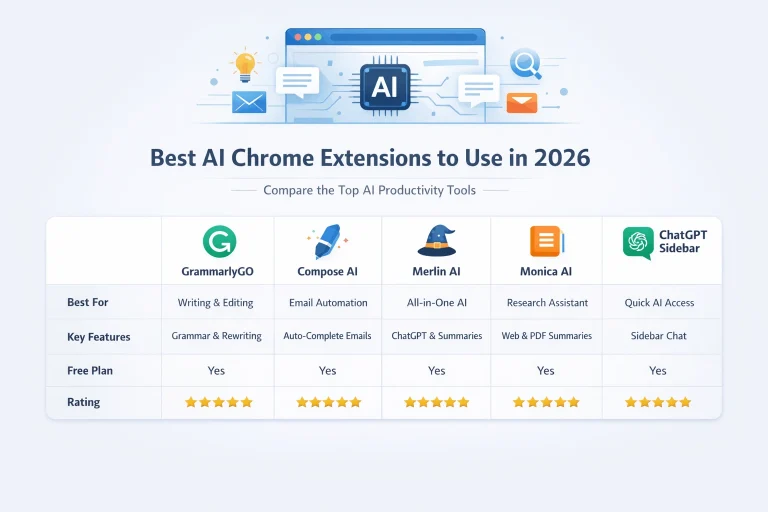
In 2026, your browser is more than just a place to browse—it’s a powerful productivity engine driven by artificial intelligence.
AI Chrome extensions have rapidly evolved into essential tools for professionals, helping with everything from content writing and research to automation and communication. These smart browser add-ons are designed to save time, boost efficiency, and enhance the quality of your work in real time.
Whether you’re a marketer, student, freelancer, or business owner, using the best AI Chrome extensions can significantly improve your daily workflow and productivity. In this updated 2026 guide, we’ll explore the top AI-powered Chrome extensions you should install right now to work smarter, faster, and more effectively.
Why AI Extensions Are Dominating Browsing in 2026
In 2026, efficiency isn’t optional—it’s a competitive advantage. AI extensions have evolved to become deeply integrated into everyday workflows, eliminating the need to switch between multiple platforms.
What’s New in 2026?
- Context-aware AI that understands what you’re doing on a page
Top AI Chrome extensions - Real-time summarization of long-form content, videos, and PDFs
- Personalized writing styles based on your tone and history
- Cross-platform automation (Gmail, Notion, LinkedIn, Slack, etc.)
- Faster response generation with improved accuracy
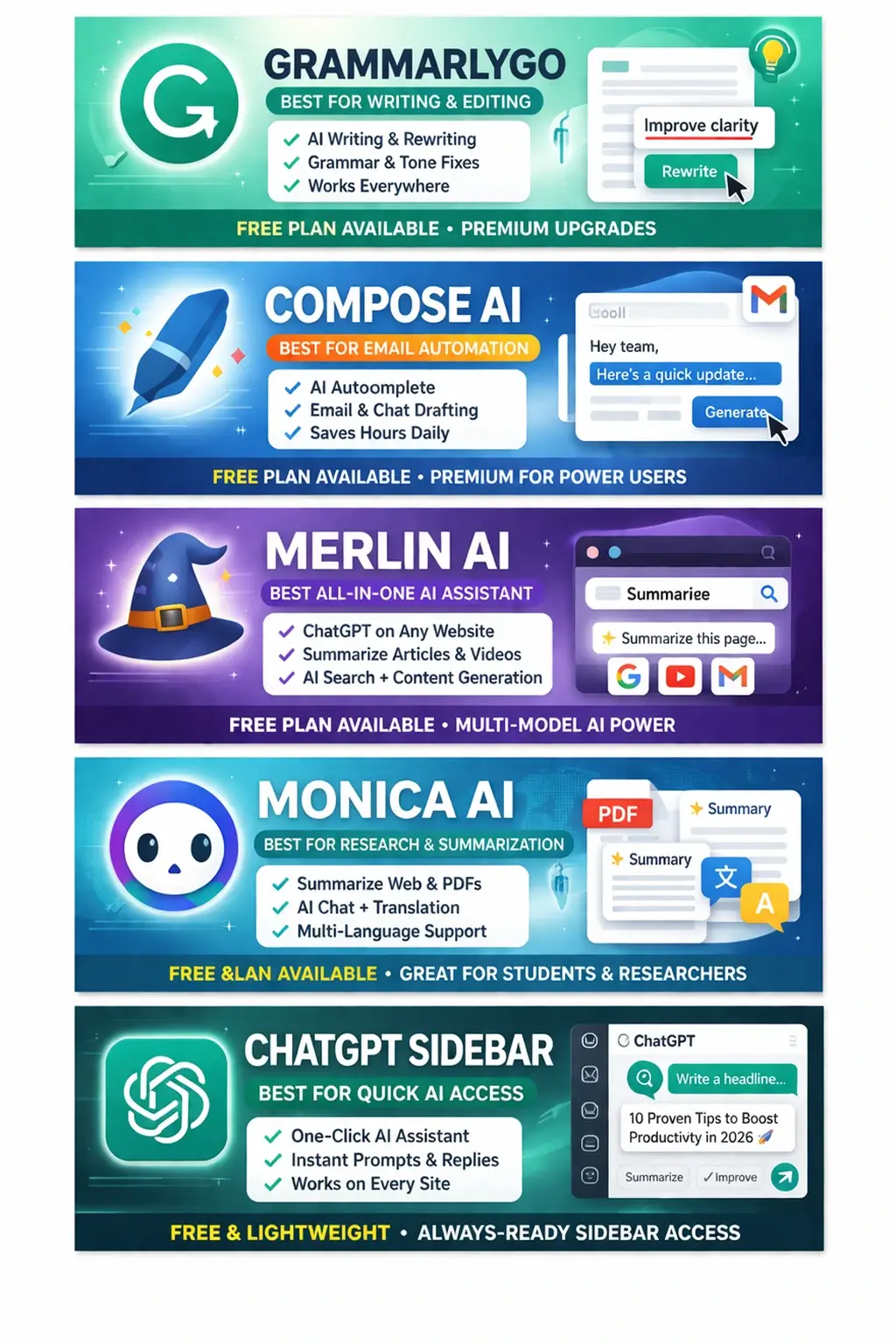
These advancements make AI browser tools essential for anyone looking to save time and boost productivity.
1. GrammarlyGO – Smarter Writing Everywhere
GrammarlyGO continues to lead in AI-powered writing by combining grammar correction with advanced generative AI capabilities.
Key Features (2026 Updates)
- Context-aware rewriting based on intent
- Personalized tone matching (professional, casual, persuasive)
- AI-generated drafts for emails, posts, and documents
- Seamless integration across browsers and apps
Why It Stands Out in 2026
GrammarlyGO now adapts to your writing style over time, making it one of the most intelligent AI productivity apps for professionals who rely heavily on communication.
2. Compose AI – Email & Chat Automation
Compose AI has become faster and more intuitive in 2026, making it a go-to solution for automating daily communication.
Key Features (2026 Updates)
- Advanced autocomplete with full paragraph generation
- Smart reply suggestions based on conversation context
- Custom tone and writing preferences
- Works across Gmail, Slack, and business tools
Best For
Busy professionals who spend hours on emails can now cut that time dramatically with Compose AI’s intelligent automation.
3. Merlin AI – ChatGPT Across the Web
Merlin AI remains one of the most powerful AI Chrome extensions, bringing advanced AI models directly into your browser.
Key Features (2026 Updates)
- Multi-model support (faster and more accurate responses)
- One-click summarization of websites, PDFs, and videos
- AI-powered search enhancements
- Works seamlessly across Google, YouTube, Gmail, and more
Why It’s Essential
Merlin AI acts as a universal AI assistant, helping with research, writing, and problem-solving without ever leaving your current tab.
4. Monica AI – Advanced Research Companion
Monica AI has evolved into a powerful research and productivity assistant, ideal for deep work and information-heavy tasks.
Key Features (2026 Updates)
- Instant summarization of long articles and documents
- Contextual Q&A based on webpage content
- Multi-language translation and rewriting
- Enhanced accuracy for technical and academic content
Ideal Users
Students, researchers, and analysts will benefit the most from Monica AI’s ability to break down complex information quickly.
5. ChatGPT Sidebar – Instant AI Access Anywhere
ChatGPT Sidebar remains a favorite for users who want quick and consistent AI access while browsing.
Key Features (2026 Updates)
- Improved prompt templates for different use cases
- Faster response times with newer AI models
- Minimal and distraction-free interface
- One-click access from any webpage
Why It’s Still Relevant
In 2026, speed matters. ChatGPT Sidebar provides instant AI assistance without interrupting your workflow.
AI Chrome Extensions Comparison Table
| Extension | Best For | Key Features | Free Plan | Ease of Use | Overall Rating |
|---|---|---|---|---|---|
| GrammarlyGO | Writing & Editing | Grammar check, tone adjustment, AI rewriting, content generation | Yes | ⭐⭐⭐⭐⭐ | ⭐⭐⭐⭐⭐ |
| Compose AI | Email Automation | Autocomplete, email drafting, tone personalization | Yes | ⭐⭐⭐⭐⭐ | ⭐⭐⭐⭐☆ |
| Merlin AI | All-in-One AI Assistant | ChatGPT access, summarization, content generation, search integration | Yes | ⭐⭐⭐⭐⭐ | ⭐⭐⭐⭐⭐ |
| Monica AI | Research & Summarization | Web/PDF summaries, AI chat, translation, multi-language support | Yes | ⭐⭐⭐⭐☆ | ⭐⭐⭐⭐☆ |
| ChatGPT Sidebar | Quick AI Access | Sidebar access, prompt templates, fast responses | Yes | ⭐⭐⭐⭐⭐ | ⭐⭐⭐⭐☆ |
Final Verdict: Which Extension Is Best for You in 2026?
Choosing the right AI Chrome extensions depends on your workflow:
- Best for writing & editing: GrammarlyGO
- Best for email automation: Compose AI
- Best all-in-one AI assistant: Merlin AI
- Best for research & summarization: Monica AI
- Best for quick AI access: ChatGPT Sidebar
Pro Tip for 2026
Power users combine multiple AI browser tools to create a fully optimized workflow. For example:
- GrammarlyGO + Compose AI for communication
- Merlin AI + Monica AI for research and content creation
Final Thoughts
The evolution of AI productivity apps in 2026 has transformed how we work online. Tasks that once required multiple tools and hours of effort can now be completed in minutes with the help of intelligent browser extensions.
If you want to stay ahead in today’s fast-paced digital world, adopting these AI Chrome extensions is no longer optional—it’s essential.
Start with one tool, explore its features, and gradually build your AI-powered workflow. The result? Greater efficiency, smarter work, and a significant edge in everything you do online.


Hey there 👋 I’m Awais, the curious mind behind iTech Observer.
I’m a tech blogger who loves diving deep into AI and Cybersecurity, but my real passion is making those topics easy to understand — especially for small business owners trying to grow in a digital world.
Here on iTech Observer, I break down the latest tech trends, tools, and security tips into practical, real-world advice you can actually use. Whether you’re trying to secure your business website, understand how AI can boost productivity, or just want to stay updated on what’s next in tech — you’re in the right place.
I believe technology should empower, not overwhelm.
Let’s explore the innovations that can make your business stronger, smarter, and more secure.
